
Privacy and safety
How WAYA protects you, in plain words.
What protects you today, what isn’t true yet, and the controls that are yours.
What protects you today
Protected in transit
Everything between your app and WAYA travels over TLS, so others on the same network can’t read it on the way.
Encrypted call transport
Call audio and video travel over encrypted WebRTC connections.
Private media
Photos, voice notes and files are stored privately, and WAYA checks who is allowed to open each one.
Careful contact matching
Phone numbers are hashed on your phone before they’re sent, then hashed again with a secret key before WAYA stores them.
Not yet
How chat encryption works
Ordinary messages and files are protected in transit and stored privately. WAYA can read them to operate, secure or support the service.
During internal testing, participating devices encrypt messages and attachments. A date in an existing chat marks where encryption starts. WAYA can still see who belongs to a chat and when messages are sent.
Read the full Privacy policyControls that are yours
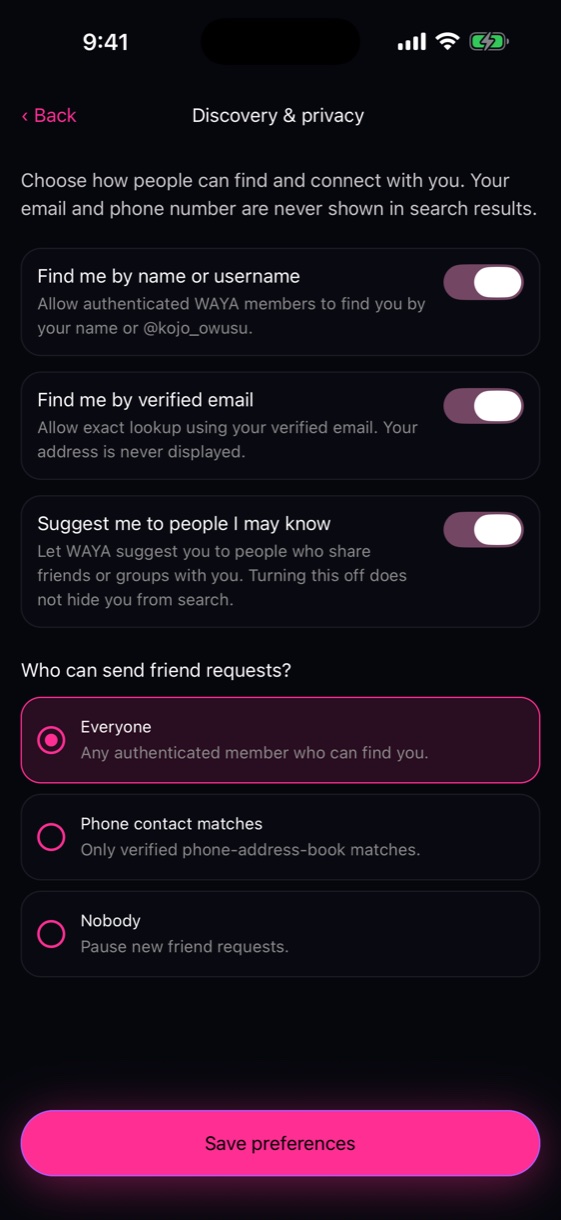
Change these whenever you like, in Discovery & privacy settings in the app.
Who can find you
Turn finding you by name or username, by verified email or by phone number, and suggestions to people you may know, on or off. Your email and phone number never show in search.
Who can send contact requests
Everyone, phone contact matches, or nobody.
Block and report
Open their profile or your chat with them and choose Block or Report.
Delete your account
In the iPhone or Android app, open You, then Settings (the gear), then Delete account. Can’t sign in? See wayahq.com/delete-account.
Something wrong? Tell us.
Report a message or a person from inside the app. For anything else, email support@wayahq.com.